Lecture 19: Hard disk - The Final Frontier#
Indexing#
Announcements#
The comprehensive Final Exam is going to be on
December 16th, at 11:30AM in Sage 3303 (this room)
Hw#6 is out, due on November 19th.
Please read carefully and test extensively before submitting.
No lecture exercise today! Lecture exercises will resume next week.
Data is stored on hard disk, read to memory for any operation.
Hard disk is permanent storage, while memory is volatile.
Types of hard disk:
Magnetic disks: slower but cheaper
Solid state: faster but more expensive
Magnetic disk read:
To read a single page: seek time (to move the read head) + rotational latency (wait for the disk to spin to the correct track) + transfer time
-> RANDOM IO to read K random pages (in different parts of the disk): K * (seek + rl + tt)
-> SEQUENTIAL IO to read K pages on the same track seek + rl + K*tt
Table: Performance Characteristics of Fast Magnetic Disks
Disk Drive |
Seek Time (ms) |
Average Rotational Latency (ms) |
Transfer Rate (MB/s) |
|---|---|---|---|
Seagate Exos 32TB |
4–9 |
4.16 |
285 |
Seagate Exos X16 16TB |
4–9 |
4.16 |
261 |
WD Ultrastar 7K6000 |
7.6–8 |
4.16 |
Varies |
HPE 26TB Enterprise HDD |
4–9 |
4.16 |
278 |
Solid state hard drives do not have moving parts, hence reads are much faster.
Virtual machines can be much slower due to the additional overhead of the virtualization.
Example:
My laptop (solid state drive):
min/avg/max/mdev = 29 us / 32.6 us / 35 us / 2.58 us
Magnetic drive
min/avg/max/mdev = 157.2 us / 166.9 us / 183.5 us / 8.78 us
Virtual machine:
min/avg/max/mdev = 481.5 us / 586.4 us / 652.8 us / 56.5 us
Table: Approximate Time to Read a 4 KB Disk Page#
Performance Measure |
HDD (Random Access) |
HDD (Sequential Access) |
SATA SSD |
|---|---|---|---|
Average seek time |
5 ms |
~0 ms* |
Negligible |
Average rotational latency |
4.17 ms |
~0 ms* |
None |
4 KB data transfer time |
0.015 ms |
0.015 ms |
0.03 ms |
Total read time |
~9.2 ms |
~0.015 ms |
~0.05–0.15 ms |
Cost to storage capacity comparison#
Storage Capacity |
Magnetic HDD Price |
SATA SSD Price |
NVMe SSD Price |
|---|---|---|---|
500 GB |
\(30–\)50 |
\(50–\)100 |
— |
1 TB |
\(40–\)80 |
\(100–\)180 |
\(120–\)190 |
2 TB |
\(60–\)120 |
\(200–\)300 |
\(240–\)350 |
4 TB |
\(100–\)200 |
\(400–\)700 |
\(450–\)700 |
8 TB |
\(200–\)350 |
$1,000+ |
$1,000+ |
12–24 TB |
\(300–\)700+ |
Limited availability |
Limited availability |
select * from bakers order by baker;
Assume:
The whole relation is stored in a single page: 10 ms
Assume that there are 4,000 values to sort:
Sorting 4,000 integers
Quicksort / Introsort 5–30 micro seconds
Mergesort 5–40 micro seconds
Heapsort 10–50 micro seconds
Bubble sort 1–5 ms
Reading the page is generally much slower than sorting.
Reliability of different storage technologies
Magnetic hard disk (HDD)
Contains moving mechanical parts.
Subject to mechanical wear, head crashes, and motor failures.
Can be affected by vibration and physical shock.
Suitable for long-term, high-capacity storage.
SATA SSD
Has no moving mechanical parts.
Resistant to mechanical shock and vibration.
Flash memory has finite write endurance.
Controller or electronic failures can occur.
NVMe SSD
Also uses flash memory, like SATA SSDs.
No moving mechanical components.
Can experience high temperatures under heavy workloads.
Reliability depends on NAND quality, controller, firmware, and write endurance.
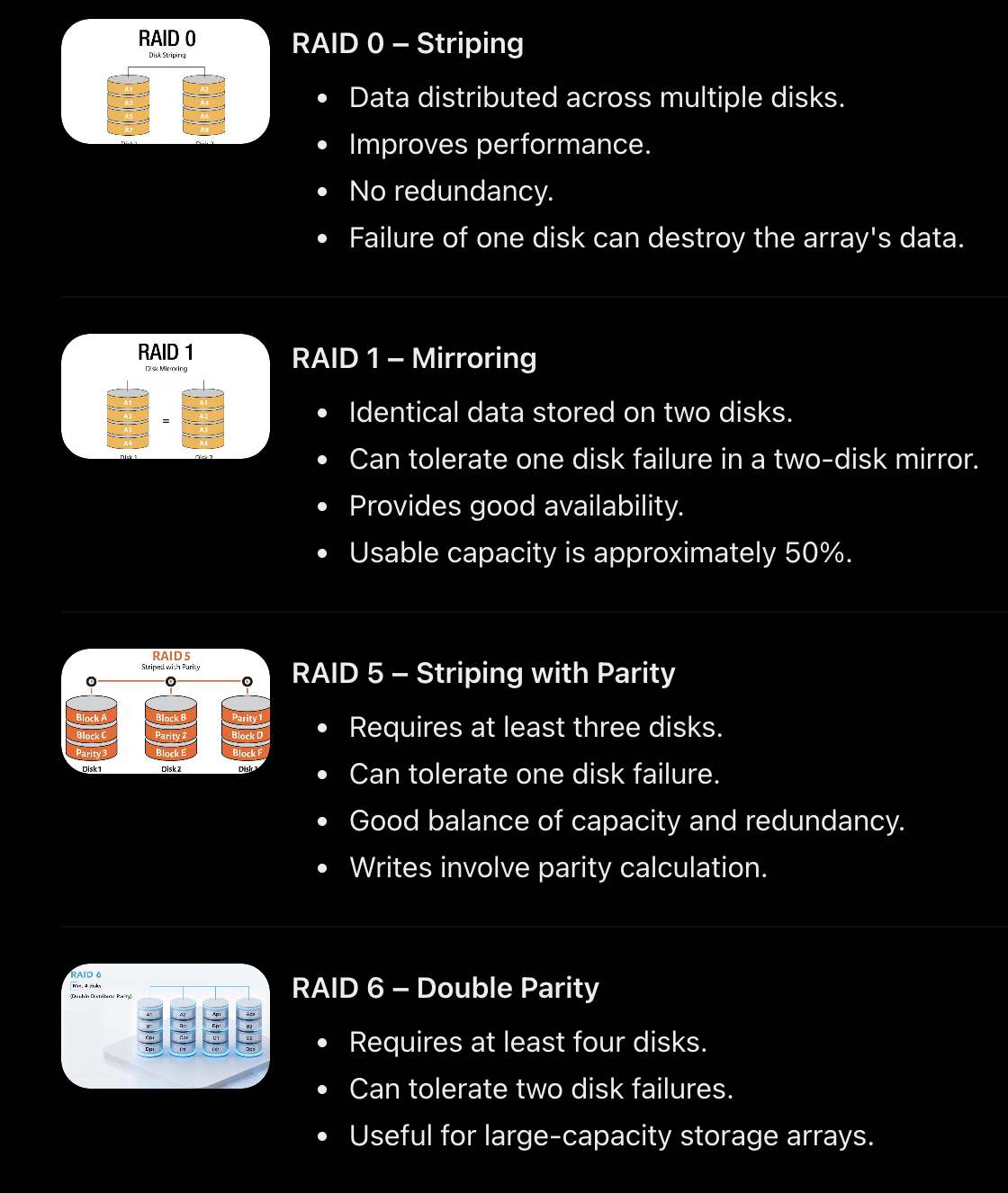
RAID Array: Redundant Array of Inexpensive Disks
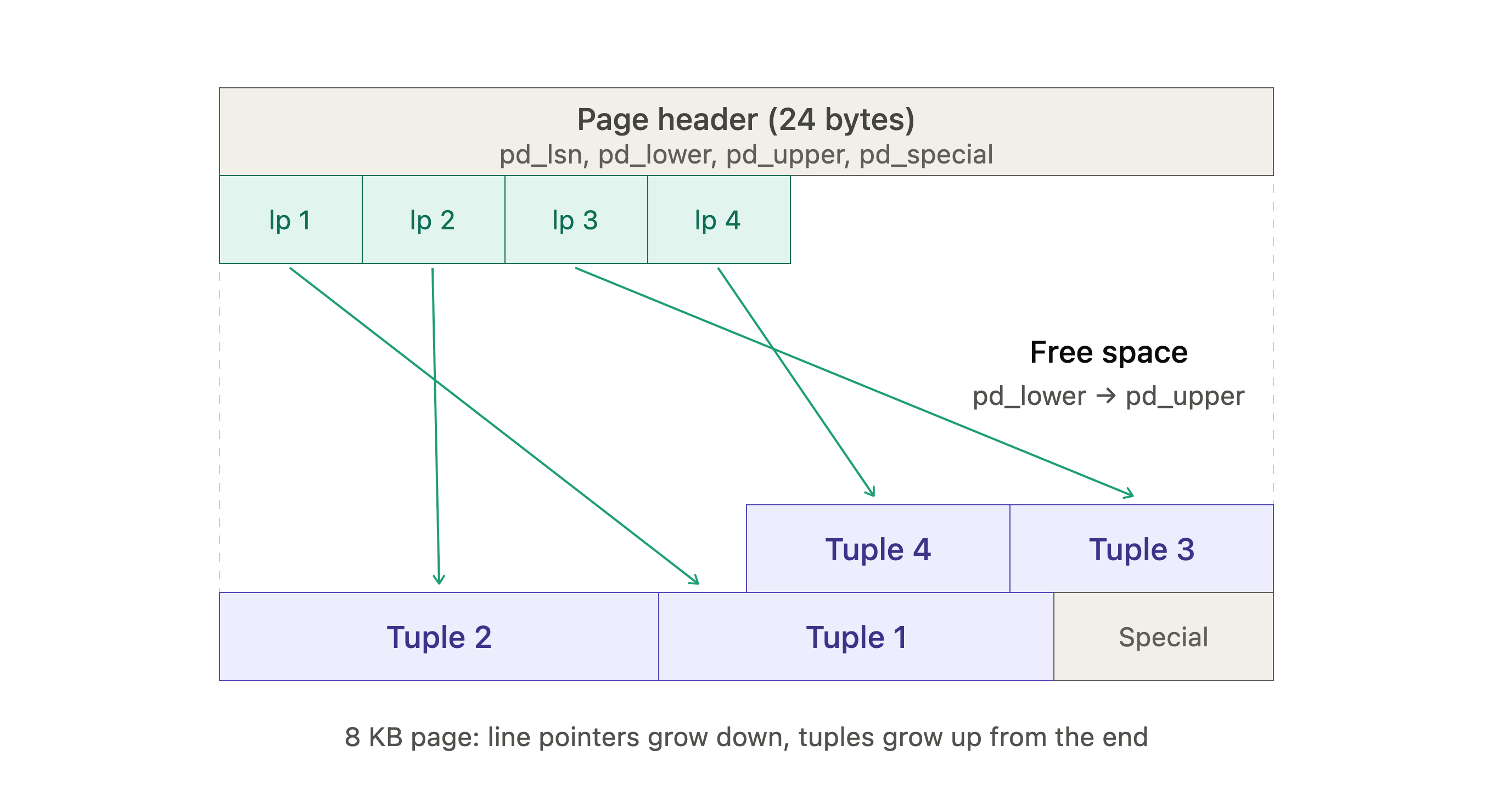
A disk page in the database stores multiple tuples.
Cost of most operations in a database are measured in terms of the number of disk pages read/written.
A disk page is the smallest unit of data that can be read/written to disk. (4K or 8K)
Whenever a disk page is read into memory, it is put into a memory block. Assume for now a block is the same size as a page.
We will use block and page interchangeably.
To READ (select): you must read data to memory.
To UPDATE/Change: you must read data to memory, change it in memory and write back to disk.
So, the cost a query:
select * from tableX;
is the cost of reading all the disk pages for the relation tableX: Sequential scan.
A single page stores many tuples (depending on the size of the attributes we store)
Number of pages depend on the size of a tuple and the number of tuples.
Indexing as a way to speed up queries#
select
    actorid
from
    actors
where
    name = 'PS' ;
Create a look up structure for the name attribute, to find where a tuple is stored for a specific name
Index on a key value (name) and a pointer to the tuple (page number for that tuple)
Actors relation has 149K tuples and 1088 pages.
Create an index on actorid, integer = 4 bytes
Create an entry for each tuple: integer(actorid) a tuple address (12 bytes) = 16 bytes per tuple
Each index page stored in an 8K disk page can index up to 8K/(16) = 512 tuples
So the leaf node of my index takes up (149000/512): 292 pages
The next level points to the leaf nodes, still can index 512 tuples at most.
B-trees - stores B entries in each node/disk page