Acknowledgements
This project was adapted from Project 3: Logic and Classical Planning from UC Berkeley CS 188 course.
What to Submit (to receive the extra credit) on Jan 31, 2025
Please complete your responses to the survey at https://surveys.rpi.edu/jfe/form/SV_4YhS81JqrL9PsG2.
You must complete Question 3, Question 4, and Question 5 in
logicPlan.py as a group.
Optional Group Project: Logic and Classical Planning

Logical Pacman, Food is good AND ghosts are bad, Spock would be so proud.
Introduction
In this project, you will use/write simple Python functions that generate logical sentences describing Pacman physics, aka pacphysics. Then you will use a SAT solver, pycosat, to solve the logical inference tasks associated with planning (generating action sequences to reach goal locations and eat all the dots), localization (finding oneself in a map, given a local sensor model), mapping (building the map from scratch), and SLAM (simultaneous localization and mapping).
As in previous programming assignments, this assignment includes an autograder for you to grade your answers on your machine. This can be run with the command:
python autograder.py
The code for this project contains the following files, available as a zip archive.
| Files you'll edit: | |
logicPlan.py |
Where you will put your code for the various logical agents. |
| Files you might want to look at: | |
logic.py |
Propsitional logic code originally from aima-python with modifications for our project. There are several useful utility functions for working with logic in here. |
logicAgents.py |
The file that defines in logical planning form the two specific problems that Pacman will encounter in this project. |
pycosat_test.py |
Quick test main function that checks that the pycosat module is installed correctly. |
game.py |
The internal simulator code for the Pacman world. The only thing you might want to look at in here is the Grid class. |
test_cases/ |
Directory containing the test cases for each question. |
| Supporting files you can ignore: | |
pacman.py |
The main file that runs Pacman games. |
logic_util.py |
Utility functions for logic.py. |
util.py |
Utility functions primarily for other projects. |
logic_planTestClasses.py |
Project specific autograding test classes. |
graphicsDisplay.py |
Graphics for Pacman. |
graphicsUtils.py |
Support for Pacman graphics. |
textDisplay.py |
ASCII graphics for Pacman. |
ghostAgents.py |
Agents to control ghosts. |
keyboardAgents.py |
Keyboard interfaces to control Pacman. |
layout.py |
Code for reading layout files and storing their contents. |
autograder.py |
Project autograder. |
testParser.py |
Parses autograder test and solution files. |
testClasses.py |
General autograding test classes. |
Files to Edit and Submit: You will fill in portions of logicPlan.py during the assignment.
Please do not change the other files in this distribution.
Evaluation: Your code will be autograded for technical correctness. Please do not change the names of any provided functions or classes within the code, or you will wreak havoc on the autograder. However, the correctness of your implementation – not the autograder’s judgements – will be the final judge of your score. If necessary, we will review and grade assignments individually to ensure that you receive due credit for your work.
Academic Dishonesty: We will be checking your code against other group submissions in the class for logical redundancy. If you copy another group's code and submit it with minor changes, we will know.
Getting Help: You are not alone! If you find yourself stuck on something, contact the course staff for help during these sessions.
Discussion: Please be careful not to post spoilers.
The Expr Class
In the first part of this project, you will be working with the Expr class defined in logic.py to build propositional logic
sentences. An Expr object is implemented
as a tree with logical operators (\(\land\), \(\lor\), \(\neg\), \(\rightarrow\),
\(\leftrightarrow\)) at each node and with literals (\(A\), \(B\), \(C\)) at the leaves. Here is an
example sentence and its representation:
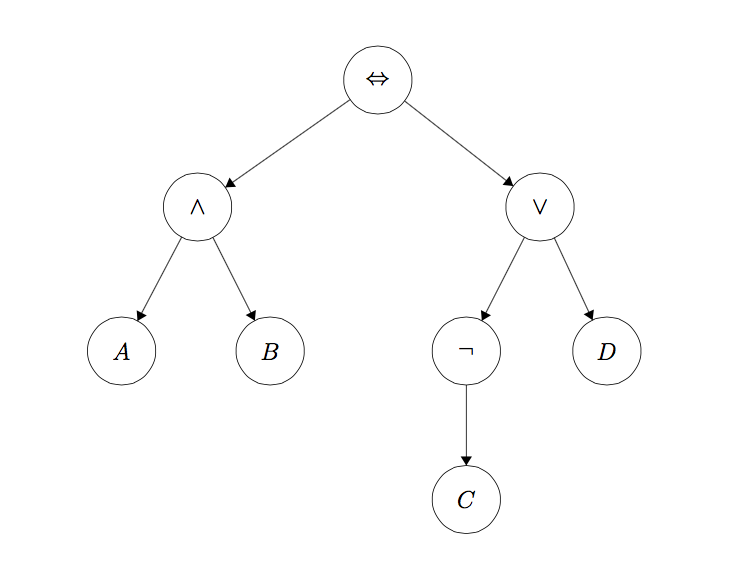
To instantiate a symbol named 'A', call the
constructor like this:
A = Expr('A')
The Expr class allows you to use Python
operators to build up these expressions. The following are the available Python operators and their
meanings:
~A: \(\neg A\)A & B: \(A \land B\)A | B: \(A \lor B\)A >> B: \(A \rightarrow B\)A % B: \(A \leftrightarrow B\)
So to build the expression \(A \land B\), you would type this:
A = Expr('A')
B = Expr('B')
a_and_b = A & B
(Note that A to the left of the assignment
operator in that example is just a Python variable name, i.e. symbol1 = Expr('A') would have worked just
as well.)
A note on conjoin and disjoin
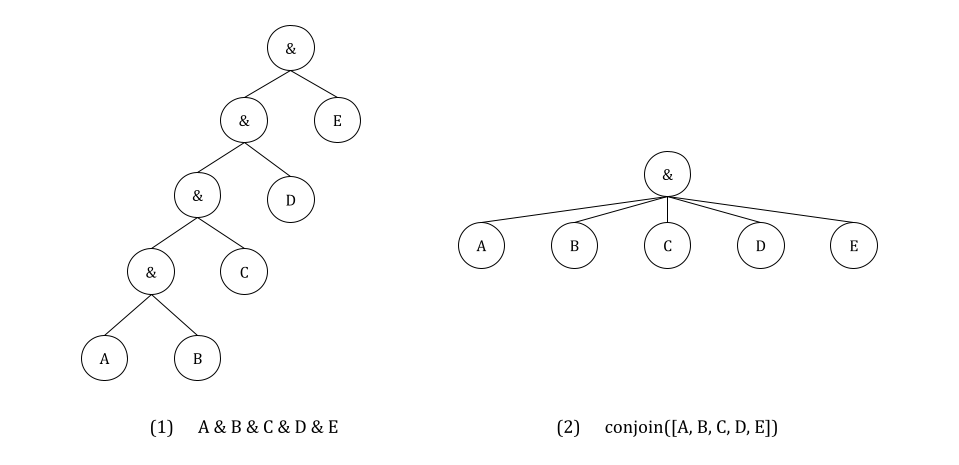
One last important thing to note is that you must use conjoin and disjoin operators wherever possible. conjoin creates a chained & (logical AND) expression, and disjoin creates a chained | (logical OR) expression. Let’s say you
wanted to check whether conditions A, B, C, D, and E are all true. The naive way to achieve this is
writing condition = A & B & C & D & E,
but this actually translates to ((((A & B) & C) & D) & E),
which creates a very nested logic tree (see (1) in diagram below) and becomes a nightmare to debug.
Instead, conjoin makes a flat tree (see
(2) in diagram below).
Prop Symbol Names (Important!)
For the rest of the project, please use the following variable naming conventions:
Rules
- When we introduce variables, they must start with an upper-case character (including
Expr). - Only these characters should appear in variable names:
A-Z,a-z,0-9,_,^,[,]. - Logical connective characters (
&,|) must not appear in variable names. So,Expr('A & B')is illegal because it attempts to create a single constant symbol named'A & B'. We would useExpr('A') & Expr('B')to make a logical expression.
Pacphysics symbols
PropSymbolExpr(pacman_str, x, y, time=t): whether or not Pacman is at \((x, y)\) at time \(t\), writesP[x,y]_t.PropSymbolExpr(wall_str, x, y): whether or not a wall is at \((x, y)\), writesWALL[x,y].PropSymbolExpr(action, time=t): whether or not pacman takes action action at time \(t\), where action is an element ofDIRECTIONS, writes i.e.North_t.- In general,
PropSymbolExpr(str, a1, a2, a3, a4, time=a5)creates the expressionstr[a1,a2,a3,a4]_a5wherestris just a string.
There is additional, more detailed documentation for the Expr class in logic.py.
SAT Solver Setup
A SAT (satisfiability) solver takes a logic expression which encodes the rules of the world and returns a model (true and false assignments to logic symbols) that satisfies that expression if such a model exists. To efficiently find a possible model from an expression, we take advantage of the pycosat module, which is a Python wrapper around the picoSAT library.
This requires installing this module/library on your machine. In the command line, run
pip install pycosat, or pip3 install pycosat on some setups, or
conda install pycosat for conda.
On Windows, if you are getting an error message saying error: Microsoft Visual C++ 14.0 or greater is required. Get it with "Microsoft Build Tools": ...,
you will have to install a C/C++ compiler following that link; or, use conda install pycosat, for which you will
need to have Anaconda installed (recommend uninstalling current Python before installing a new one)
and run this from the Anaconda prompt.
Testing pycosat installation:
After unzipping the project code and changing to the project code directory, run:
python pycosat_test.py
This should output:
[1, -2, -3, -4, 5]
Please let us know if you have issues with this setup. This is critical to completing the project, and we don’t want you to spend your time fighting with this installation process.
Q1: Logic Warm-up
This question will give you practice working with the Expr data type used in the project to
represent propositional logic sentences. You will implement the following functions in logicPlan.py:
sentence1(): Create oneExprinstance that represents the proposition that the following three sentences are true. Do not do any logical simplification, just put them in a list in this order, and return the list conjoined. Each element of your list should correspond to each of the three sentences.
sentence2(): Create oneExprinstance that represents the proposition that the following four sentences are true. Again, do not do any logical simplification, just put them in a list in this order, and return the list conjoined.
sentence3(): Using thePropSymbolExprconstructor, create the symbols'PacmanAlive_0','PacmanAlive_1','PacmanBorn_0', and'PacmanKilled_0'(hint: recall thatPropSymbolExpr(str, a1, a2, a3, a4, time=a5)creates the expressionstr[a1,a2,a3,a4]_a5wherestris a string; you should make some strings for this problem to match these exactly). Then, create oneExprinstance which encodes the following three English sentences as propositional logic in this order without any simplification:- Pacman is alive at time 1 if and only if he was alive at time 0 and he was not killed at time 0 or he was not alive at time 0 and he was born at time 0.
- At time 0, Pacman cannot both be alive and be born.
- Pacman is born at time 0.
findModelUnderstandingCheck():- Look at how the
findModel(sentence)method works: it usesto_cnfto convert the input sentence into Conjunctive Normal Form (the form required by the SAT solver), and passes it to the SAT solver to find a satisfying assignment to the symbols insentence, i.e., a model. A model is a dictionary of the symbols in your expression and a corresponding assignment ofTrueorFalse. Test yoursentence1(),sentence2(), andsentence3()with findModel by opening an interactive session in Python and runningfrom logicPlan import *andfindModel(sentence1())and similar queries for the other two. Do they match what you were expecting? - Based on the above, fill in
findModelUnderstandingCheckso that it returns whatfindModel(Expr('a'))would return if lower case variables were allowed. You should not usefindModelorExprbeyond what’s already given; simply directly recreate the output.
- Look at how the
-
entails(premise, conclusion): ReturnTrueif and only if thepremiseentails theconclusion. Hint:findModelis helpful here; think about what must be unsatisfiable in order for the entails to beTrue, and what it means for something to be unstatisfiable. plTrueInverse(assignments, inverse_statement): ReturnsTrueif and only if the (notinverse_statement) isTruegivenassignments.
Before you continue, try instantiating a small sentence, e.g. \(A \land B \rightarrow C\), and call
to_cnf on it. Inspect the output and make
sure you understand it.
To test and debug your code run:
python autograder.py -q q1
Q2: Logic Workout
Implement the following three functions in logicPlan.py (remembering to use conjoin and disjoin whenever possible):
atLeastOne(literals): Return a single expression (Expr) in CNF that is true only if at least one expression in the input list is true. Each input expression will be a literal.atMostOne(literals): Return a single expression (Expr) in CNF that is true only if at most one expression in the input list is true. Each input expression will be a literal. Hint: Useitertools.combinations. If you have literals, and at most one is true, your resulting CNF expression should be a conjunction of clauses.exactlyOne(literals): UseatLeastOneandatMostOneto return a single expression (Expr) in CNF that is true only if exactly one expression in the input list is true. Each input expression will be a literal.
Each of these methods takes a list of Expr
literals and returns a single Expr
expression that
represents the appropriate logical relationship between the expressions in the input list. An
additional
requirement is that the returned Expr must
be in
CNF (conjunctive normal form). You may NOT use the to_cnf function in your method
implementations (or any of the helper functions logic.eliminate_implications, logic.move_not_inwards, and logic.distribute_and_over_or).
Don’t run to_cnf on your knowledge base
when
implementing your planning agents in later questions. This is because to_cnf makes your logical expression much
longer
sometimes, so you want to minimize this effect; findModel does this as needed. In later
questions,
reuse your implementations for atLeastOne(.),
atMostOne(.), and exactlyOne(.) instead of re-engineering
these
functions from scratch. This avoids accidentally making unreasonably slow non-CNF-based
implementations.
You may utilize the logic.pl_true function
to
test the output of your expressions. pl_true takes
an expression and a model and returns True
if and
only if the expression is true given the model.
To test and debug your code run:
python autograder.py -q q2
Q3: Pacphysics and Satisfiability
In this question, you will implement the basic pacphysics logical expressions, as well as learn how to prove where pacman is and isn’t by building an appropriate knowledge base (KB) of logical expressions.
Implement the following functions in logicPlan.py:
pacmanSuccessorAxiomSingle– this generates an expression defining the sufficient and necessary conditions for Pacman to be at at :- Read the construction of
possible_causesprovided. - You need to fill out the return statement, which will be an
Expr. Make sure to usedisjoinandconjoinwhere appropriate. Looking atSLAMSuccessorAxiomSinglemay be helpful, although note that the rules there are more complicated than in this function. The simpler side of the biconditional should be on the left for autograder purposes.
- Read the construction of
pacphysicsAxioms– here, you will generate a bunch of physics axioms. For timestep :- Arguments:
- Required:
tis time,all_coordsandnon_outer_wall_coordsare lists of tuples. - Possibly-
None: You will be using these to call functions, not much logic is required.walls_gridis only passed through tosuccessorAxiomsand describes (known) walls.sensorModel(t: int, non_outer_wall_coords) -> Exprreturns a singleExprdescribing observation rules; you can take a look atsensorAxiomsandSLAMSensorAxiomsto see examples of this.successorAxioms(t: int, walls_grid, non_outer_wall_coords) -> Exprdescribes transition rules, e.g. how previous locations and actions of Pacman affect the current location; we have seen this in the functions inpacmanSuccessorAxiomSingle.
- Required:
- Algorithm:
- For all
in
all_coords, append the following implication (if-then form): if a wall is at , then Pacman is not at at . - Pacman is at exactly one of the
non_outer_wall_coordsat timestep . - Pacman takes exactly one of the four actions in
DIRECTIONSat timestep . - Sensors: append the result of
sensorAxioms. All callers except forcheckLocationSatisfiabilitymake use of this; how to handle the case where we don’t want any sensor axioms added is up to you. - Transitions: append the result of
successorAxioms. All callers will use this. - Add each of the sentences above to
pacphysics_sentences. As you can see in the return statement, these will be conjoined and returned.
- For all
in
- Function passing syntax:
- Let
def myFunction(x, y, t): return PropSymbolExpr('hello', x, y, time=t)be a function we want to use. - Let
def myCaller(func: Callable): ...be the caller that wants to use a function. - We can pass the function in:
myCaller(myFunction). Note thatmyFunctionis not called with()after it. - We can use
myFunctionby having insidemyCallerthis:useful_return = func(0, 1, q).
- Let
- Arguments:
checkLocationSatisfiability– given a transition(x0_y0, action0, x1_y1),action1, and aproblem, you will write a function that will return a tuple of two models(model1, model2):- In
model1, Pacman is at at time givenx0_y0,action0,action1. This model proves that it’s possible that Pacman there. Notably, ifmodel1isFalse, we know Pacman is guaranteed to NOT be there. - In
model2, Pacman is NOT at at time givenx0_y0,action0,action1. This model proves that it’s possible that Pacman is not there. Notably, ifmodel2isFalse, we know Pacman is guaranteed to be there. action1has no effect on determining whether the Pacman is at the location; it’s there just to match your solution to the autograder solution.- To implement this problem, you will need to add the following expressions to
your KB:
- Add to KB:
pacphysics_axioms(...)with the appropriate timesteps. There is nosensorModelbecause we know everything about the world. Where needed, useallLegalSuccessorAxiomsfor transitions since this is for regular Pacman transition rules. - Add to KB: Pacman’s current location
- Add to KB: Pacman takes
action0 - Add to KB: Pacman takes
action1
- Add to KB:
- Query the SAT solver with
findModelfor two models described earlier. The queries should be different; for a reminder on how to make queries seeentails.
- In
Reminder: the variable for whether Pacman is at
at time is PropSymbolExpr(pacman_str, x, y, time=t),
wall exists
at
is PropSymbolExpr(wall_str, x, y),
and action is taken at is PropSymbolExpr(action, time=t).
To test and debug your code run:
python autograder.py -q q3
Q4: Path Planning with Logic
Pacman is trying to find the end of the maze (the goal position). Implement the following method using propositional logic to plan Pacman’s sequence of actions leading him to the goal:
Disclaimer: the methods from now on will be decently slow. This is because a SAT
solver is very general and simply crunches logic, unlike our previous algorithms
that employ a specific human-created algorithm to specific type of problem. Of note,
pycosat’s actual
algorithms are in C, which is generally a much much faster language to execute than
Python, and it’s still this slow.
positionLogicPlan(problem)– given an instance oflogicPlan.PlanningProblem, returns a sequence of action strings for the Pacman agent to execute.
You will not be implementing a search algorithm, but creating expressions that represent pacphysics for all possible positions at each time step. This means that at each time step, you should be adding general rules for all possible locations on the grid, where the rules do not assume anything about Pacman’s current position.
You will need to code up the following sentences for your knowledge base, in the following pseudocode form:
- Add to KB: Initial knowledge: Pacman’s initial location at timestep
- for t in range(50) (because Autograder will not test on layouts requiring
timesteps)
- Print time step; this is to see that the code is running and how far it is.
- Add to KB: Initial knowledge: Pacman can only be at
exactlyOneof the locations innon_wall_coordsat timestep . This is similar topacphysicsAxioms, but don’t use that method since we are usingnon_wall_coorswhen generating the list of possible locations in the first place (andwalls_gridlater). - Is there a satisfying assignment for the variables given the knowledge
base so far? Use
findModeland pass in the Goal Assertion and KB.- If there is, return a sequence of actions from start to goal
using
extractActionSequence. - Here, Goal Assertion is the expression asserting that Pacman is at the goal at timestep .
- If there is, return a sequence of actions from start to goal
using
- Add to KB: Pacman takes exactly one action per timestep.
- Add to KB: Transition Model sentences: call
pacmanSuccessorAxiomSingle(...)for all possible pacman positions innon_wall_coords.
Test your code on smaller mazes using:
                            python pacman.py -l maze2x2 -p LogicAgent -a fn=plp

                        python pacman.py -l tinyMaze -p LogicAgent -a fn=plp
To test and debug your code run:
python autograder.py -q q4
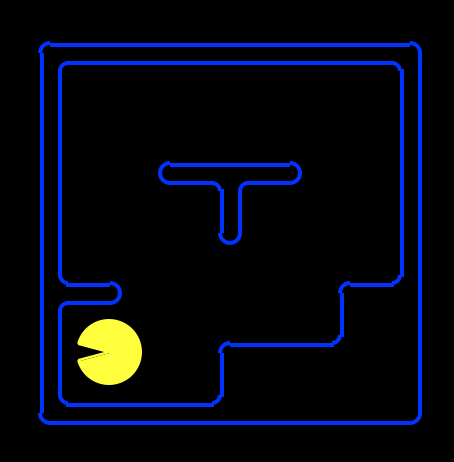
Note that with the way we have Pacman’s grid laid out, the left-most bottom-most space occupiable by Pacman (assuming there isn’t a wall there) is and not , as shown below.
- For all , , : if there is a wall at , then pacman is not at at .
- For each : Pacman is at exactly on of the locations described by all possible . Can be optimized with knowledge of outer or all walls, follow spec for each function.
- For each : Pacman takes exactly on of the possible actions.
- For each (except for = ??), transition model: Pacman is at at if and only if he was at [join with or, over all possible : at and took action at ].
Note that the above always hold true regardless of any specific game, actions, etc. To the above always-true/ axiom rules, we add information consistent with what we know.
Debugging hints:
- If you’re finding a length-0 or a length-1 solution: is it enough to simply have axioms for where Pacman is at a given time? What’s to prevent him from also being in other places?
- As a sanity check, verify that if Pacman is at at time and at at time , he was never at at any time in between.
- If your solution is taking more than a couple minutes to finish running,
you may want to revisit
implementation of
exactlyOneandatMostOne, and ensure that you’re using as few clauses as possible.
Q5: Eating All the Food
Pacman is trying to eat all of the food on the board. Implement the following method using propositional logic to plan Pacman’s sequence of actions leading him to the goal.
foodLogicPlan(problem): Given an instance oflogicPlan.PlanningProblem, returns a sequence of action strings for the Pacman agent to execute.
This question has the same general format as question 4; you may copy your code from there as a starting point. The notes and hints from question 4 apply to this question as well. You are responsible for implementing whichever successor state axioms are necessary that were not implemented in previous questions.
What you will change from the previous question:
- Initialize
variables based on what we
initially know using the code
PropSymbolExpr(food_str, x, y, time=t), where each variable is true if and only if there is a food at at time . - Change the goal assertion: your goal assertion sentence must be true if and only if all of the food have been eaten. This happens when all are false.
- Add a food successor axiom: what is the relation between and and ? The food successor axiom should only involve these three variables, for any given and . Think about what the transition model for the food variables looks like, and add these sentences to your knowledge base at each timestep.
Test your code using:
python pacman.py -l testSearch -p LogicAgent -a fn=flp,prob=FoodPlanningProblem
We will not test your code on any layouts that require more than 50 time steps.
To test and debug your code run:
python autograder.py -q q5