Acknowledgements
This project is part of the CS 188 projects created by John DeNero, Dan Klein, Pieter Abbeel, and many others.
Project 1: Search in Pacman
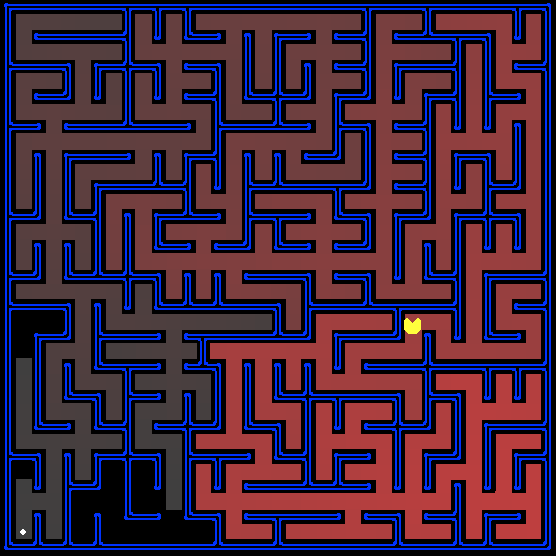
All those colored walls,
Mazes give Pacman the blues,
So teach him to search.
Introduction
In this project, your Pacman agent will find paths through his maze world, both to reach a particular location and to collect food efficiently. You will build general search algorithms and apply them to Pacman scenarios.
The code for this project consists of several Python files, some of which you will need to read and understand in order to complete the assignment, and some of which you can ignore. You can download all the code and supporting files, including the autograder, as a zip archive.
| Files you'll edit: | |
search.py |
Where all of your search algorithms will reside. |
searchAgents.py |
Where all of your search-based agents will reside. |
| Files you might want to look at: | |
pacman.py |
The main file that runs Pacman games. This file describes a Pacman GameState type, which you use in this project. |
game.py |
The logic behind how the Pacman world works. This file describes several supporting types like AgentState, Agent, Direction, and Grid. |
util.py |
Useful data structures for implementing search algorithms. |
| Supporting files you can ignore: | |
graphicsDisplay.py |
Graphics for Pacman |
graphicsUtils.py |
Support for Pacman graphics |
textDisplay.py |
ASCII graphics for Pacman |
ghostAgents.py |
Agents to control ghosts |
keyboardAgents.py |
Keyboard interfaces to control Pacman |
layout.py |
Code for reading layout files and storing their contents |
What to submit: You will fill in portions of
search.py and
searchAgents.py during the assignment. You should
submit these two files (only).
Evaluation: Your code will be autograded for technical correctness. Please do not change the names of any provided functions or classes within the code, or you will wreak havoc on the autograder. However, the correctness of your implementation -- not the autograder's output -- will be the final judge of your score. If necessary, we will review and grade assignments individually to ensure that you receive due credit for your work.
Academic Dishonesty: We will be checking your code against other submissions in the class for logical redundancy. If you copy someone else's code and submit it with minor changes, we will know. These cheat detectors are quite hard to fool, so please don't try. We trust you all to submit your own work only; please don't let us down.
Getting Help: You are not alone! If you find yourself stuck on something, contact the course staff for help. Office hours and piazza are there for your support; please use them. If you can't make our office hours, let us know and we will schedule more. We want these projects to be rewarding and instructional, not frustrating and demoralizing. But, we don't know when or how to help unless you ask. One more piece of advice: if you don't know what a variable does or what kind of values it takes, print it out.
Welcome to Pacman
After downloading the code (search.zip), unzipping it and changing to the search directory, you should be able to play a game of Pacman by typing the following at the command line:python pacman.pyNote: if you get error messages regarding python-tk, use your package manager to install python-tk, or see this page for more detailed instructions. Pacman lives in a shiny blue world of twisting corridors and tasty round treats. Navigating this world efficiently will be Pacman's first step in mastering his domain.
The simplest agent in searchAgents.py is called the
GoWestAgent, which always goes West (a trivial reflex agent). This agent can
occasionally win:
python pacman.py --layout testMaze --pacman GoWestAgentBut, things get ugly for this agent when turning is required:
python pacman.py --layout tinyMaze --pacman GoWestAgentIf pacman gets stuck, you can exit the game by typing CTRL-c into your terminal. Soon, your agent will solve not only
tinyMaze, but any maze you want.
Note that pacman.py supports a number of options that can
each be expressed in a long way (e.g., --layout) or a short way (e.g., -l).
You can see the list of all options and their default values via:
python pacman.py -hAlso, all of the commands that appear in this project also appear in commands.txt, for easy copying and pasting. In UNIX/Mac OS X, you can even run all these commands in order with
bash commands.txt.
Finding a Fixed Food Dot using Search Algorithms
InsearchAgents.py, you'll find a fully implemented
SearchAgent, which plans out a path through Pacman's world and then executes that path
step-by-step. The search algorithms for formulating a plan are not implemented -- that's your job. As
you work through the following questions, you might need to refer to this glossary
of objects in the code.
First, test that the SearchAgent is working correctly by running:
python pacman.py -l tinyMaze -p SearchAgent -a fn=tinyMazeSearchThe command above tells the
SearchAgent to use tinyMazeSearch as its search
algorithm, which is implemented in search.py. Pacman should
navigate the maze successfully.
Now it's time to write full-fledged generic search functions to help Pacman plan routes! Pseudocode for the search algorithms you'll write can be found in the lecture slides and textbook. Remember that a search node must contain not only a state but also the information necessary to reconstruct the path (plan) which gets to that state.
Important note: All of your search functions need to return a list of actions that will lead the agent from the start to the goal. These actions all have to be legal moves (valid directions, no moving through walls).
Hint: Each algorithm is very similar. Algorithms for DFS, BFS, UCS, and A* differ only in the details of how the fringe is managed. So, concentrate on getting DFS right and the rest should be relatively straightforward. Indeed, one possible implementation requires only a single generic search method which is configured with an algorithm-specific queuing strategy. (Your implementation need not be of this form to receive full credit).
Hint: Make sure to check out the Stack, Queue and PriorityQueue
types provided to you in util.py!
Question 1 (2 points) Implement the depth-first search (DFS) algorithm in
the
depthFirstSearch function in search.py. To
make your algorithm complete, write the graph search version of DFS, which avoids expanding
any already visited states (textbook section 3.5).
Your code should quickly find a solution for:
python pacman.py -l tinyMaze -p SearchAgent
python pacman.py -l mediumMaze -p SearchAgent
python pacman.py -l bigMaze -z .5 -p SearchAgentThe Pacman board will show an overlay of the states explored, and the order in which they were explored (brighter red means earlier exploration). Is the exploration order what you would have expected? Does Pacman actually go to all the explored squares on his way to the goal?
Hint: If you use a Stack as your data structure, the solution found by your
DFS algorithm for mediumMaze should have a length of 130 (provided you push successors
onto the fringe in the order provided by getSuccessors; you might get 244 if you push them in the
reverse order). Is this a least cost solution? If not, think about what depth-first search is doing
wrong.
Question 2 (2 point) Implement the breadth-first search (BFS) algorithm in
the
breadthFirstSearch function in search.py.
Again, write a graph search algorithm that avoids expanding any already visited states. Test your
code the same way you did for depth-first search.
python pacman.py -l mediumMaze -p SearchAgent -a fn=bfs
python pacman.py -l bigMaze -p SearchAgent -a fn=bfs -z .5Does BFS find a least cost solution? If not, check your implementation.
Hint: If Pacman moves too slowly for you, try the option --frameTime 0.
Note: If you've written your search code generically, your code should work equally well for the eight-puzzle search problem (textbook section 3.2) without any changes.
python eightpuzzle.py
Varying the Cost Function
While BFS will find a fewest-actions path to the goal, we might want to find paths that are "best" in other senses. ConsidermediumDottedMaze and
mediumScaryMaze. By changing the cost function,
we can encourage Pacman to find different paths. For example, we can charge more for dangerous steps in
ghost-ridden areas or less for steps in food-rich areas, and a rational Pacman agent should adjust its
behavior in response.
Question 3 (2 points) Implement the uniform-cost graph search algorithm in
the uniformCostSearch function in
search.py. We encourage you to look through
util.py for some data structures that may be useful in
your implementation. You should now observe successful behavior in all three of the following
layouts, where the agents below are all UCS agents that differ only in the cost function they use
(the agents and cost functions are written for you):
python pacman.py -l mediumMaze -p SearchAgent -a fn=ucs
python pacman.py -l mediumDottedMaze -p StayEastSearchAgent
python pacman.py -l mediumScaryMaze -p StayWestSearchAgent
Note: You should get very low and very high path costs for the
StayEastSearchAgent and StayWestSearchAgent respectively, due to their
exponential cost functions (see searchAgents.py
for details).
A* search
Question 4 (3 points) Implement A* graph search in the empty function
aStarSearch in search.py. A* takes a
heuristic function as an argument. Heuristics take two arguments: a state in the search problem (the
main argument), and the problem itself (for reference information). The nullHeuristic
heuristic function in search.py is a trivial example.
You can test your A* implementation on the original problem of finding a path through a maze to a
fixed position using the Manhattan distance heuristic (implemented already as
manhattanHeuristic in
searchAgents.py).
python pacman.py -l bigMaze -z .5 -p SearchAgent -a fn=astar,heuristic=manhattanHeuristicYou should see that A* finds the optimal solution slightly faster than uniform cost search (about 549 vs. 620 search nodes expanded in our implementation, but ties in priority may make your numbers differ slightly). What happens on
openMaze for the various search strategies?
Finding All the Corners
The real power of A* will only be apparent with a more challenging search problem. Now, it's time to formulate a new problem and design a heuristic for it.
In corner mazes, there are four dots, one in each corner. Our new search problem is to find
the shortest path through the maze that touches all four corners (whether the maze actually has food
there or not). Note that for some mazes like tinyCorners, the
shortest path does not always go to the closest food first! Hint: the shortest path through
tinyCorners takes 28 steps.
Question 5 (2 points) Implement the CornersProblem search
problem in searchAgents.py. You will need to
choose a state representation that encodes all the information necessary to detect whether all four
corners have been reached. Now, your search agent should solve:
python pacman.py -l tinyCorners -p SearchAgent -a fn=bfs,prob=CornersProblem
python pacman.py -l mediumCorners -p SearchAgent -a fn=bfs,prob=CornersProblemTo receive full credit, you need to define an abstract state representation that does not encode irrelevant information (like the position of ghosts, where extra food is, etc.). In particular, do not use a Pacman
GameState as a search state. Your code will be very, very slow if you
do (and also wrong).
Hint: The only parts of the game state you need to reference in your implementation are the starting Pacman position and the location of the four corners.
Our implementation of breadthFirstSearch expands just under 2000 search nodes on mediumCorners. However, heuristics (used with A* search)
can reduce the amount of searching required.
Question 6 (3 points) Implement a non-trivial, consistent heuristic for
the CornersProblem in cornersHeuristic.
Grading: inconsistent heuristics will get no credit. 1 point for any non-trivial consistent
heuristic.
1 point for expanding fewer than 1600 nodes. 1 point for expanding fewer than 1200 nodes. Expand
fewer than 800, and you're doing great!
python pacman.py -l mediumCorners -p AStarCornersAgent -z 0.5
Note: AStarCornersAgent is a shortcut for
-p SearchAgent -a fn=aStarSearch,prob=CornersProblem,heuristic=cornersHeuristic.
Admissibility vs. Consistency: Remember, heuristics are just functions that take search states and return numbers that estimate the cost to a nearest goal. More effective heuristics will return values closer to the actual goal costs. To be admissible, the heuristic values must be lower bounds on the actual shortest path cost to the nearest goal (and non-negative). To be consistent, it must additionally hold that if an action has cost c, then taking that action can only cause a drop in heuristic of at most c.
Remember that admissibility isn't enough to guarantee correctness in graph search -- you need the stronger condition of consistency. However, admissible heuristics are usually also consistent, especially if they are derived from problem relaxations. Therefore it is usually easiest to start out by brainstorming admissible heuristics. Once you have an admissible heuristic that works well, you can check whether it is indeed consistent, too. The only way to guarantee consistency is with a proof. However, inconsistency can often be detected by verifying that for each node you expand, its successor nodes are equal or higher in in f-value. Morevoer, if UCS and A* ever return paths of different lengths, your heuristic is inconsistent. This stuff is tricky! If you need help, don't hesitate to ask the course staff.
Non-Trivial Heuristics: The trivial heuristics are the ones that return zero everywhere (UCS) and the heuristic which computes the true completion cost. The former won't save you any time, while the latter will timeout the autograder. You want a heuristic which reduces total compute time, though for this assignment the autograder will only check node counts (aside from enforcing a reasonable time limit).
Additionally, any heuristic should always be non-negative, and should return a value of 0 at every goal state (technically this is a requirement for admissibility!). We will deduct 1 point for any heuristic that returns negative values, or doesn't behave properly at goal states.
Eating All The Dots
Now we'll solve a hard search problem: eating all the Pacman food in as few steps as possible. For this, we'll need a new search problem definition which formalizes the food-clearing problem:FoodSearchProblem in searchAgents.py
(implemented for you). A solution is defined to be a path that collects all of the food in the Pacman
world. For the present project, solutions do not take into account any ghosts or power pellets;
solutions only depend on the placement of walls, regular food and Pacman. (Of course ghosts can ruin the
execution of a solution! We'll get to that in the next project.) If you have written your general search
methods correctly, A* with a null heuristic (equivalent to uniform-cost search) should
quickly find an optimal solution to testSearch with no code change
on your part (total cost of 7).
python pacman.py -l testSearch -p AStarFoodSearchAgent
Note: AStarFoodSearchAgent is a shortcut for
-p SearchAgent -a fn=astar,prob=FoodSearchProblem,heuristic=foodHeuristic.
You should find that UCS starts to slow down even for the seemingly simple
tinySearch. As a reference, our implementation
takes 2.5 seconds to find a path of length 27 after expanding 4902 search nodes.
Question 7 (5 points) Fill in foodHeuristic in
searchAgents.py with a
FoodSearchProblem. Try your agent on the
trickySearch board:
python pacman.py -l trickySearch -p AStarFoodSearchAgentAny non-trivial consistent heuristic will receive 1 point. You will also receive the following additional points, depending on how few nodes your heuristic expands.
| Fewer nodes than: | Points |
|---|---|
| 15000 | 1 |
| 12000 | 2 |
| 9000 | 3 (medium) |
| 7000 | 4 (hard) |
Remember: If your heuristic is inconsistent, you will receive no credit, so be
careful! Can you solve mediumSearch in a short
time? If so, we're either very, very impressed, or your heuristic is inconsistent.
We will deduct 1 point for any heuristic that returns negative values, or does not return 0 at every goal state.
Suboptimal Search
Sometimes, even with A* and a good heuristic, finding the optimal path through all the dots is hard.
In these cases, we'd still like to find a reasonably good path, quickly. In this section, you'll
write an agent that always greedily eats the closest dot. ClosestDotSearchAgent is
implemented for you in searchAgents.py, but it's
missing a key function that finds a path to the closest dot.
Question 8 (2 points) Implement the function
findPathToClosestDot in
searchAgents.py. Our agent solves this maze
(suboptimally!) in under a second with a path cost of 350:
python pacman.py -l bigSearch -p ClosestDotSearchAgent -z .5
Hint: The quickest way to complete findPathToClosestDot is to fill in the
AnyFoodSearchProblem, which is missing its goal test. Then, solve that problem with an
appropriate search function. The solution should be very short!
Your ClosestDotSearchAgent won't always find the shortest possible path through the
maze.
Object Glossary
Here's a glossary of the key objects in the code base related to search problems, for your reference:
SearchProblem (search.py)- A SearchProblem is an abstract object that represents the state space, successor function,
costs, and goal state of a problem. You will interact with any SearchProblem only through the
methods defined at the top of
search.py PositionSearchProblem (searchAgents.py)- A specific type of SearchProblem that you will be working with --- it corresponds to searching for a single pellet in a maze.
CornersProblem (searchAgents.py)- A specific type of SearchProblem that you will define --- it corresponds to searching for a path through all four corners of a maze.
FoodSearchProblem (searchAgents.py)- A specific type of SearchProblem that you will be working with --- it corresponds to searching for a way to eat all the pellets in a maze.
- Search Function
- A search function is a function which takes an instance of SearchProblem as a parameter, runs
some algorithm, and returns a sequence of actions that lead to a goal. Example of search
functions are
depthFirstSearchandbreadthFirstSearch, which you have to write. You are providedtinyMazeSearchwhich is a very bad search function that only works correctly ontinyMaze SearchAgentSearchAgentis a class which implements an Agent (an object that interacts with the world) and does its planning through a search function. TheSearchAgentfirst uses the search function provided to make a plan of actions to take to reach the goal state, and then executes the actions one at a time.